Lab Two: Documenting the Variety of Cultural / Physical Geography in El Paso County, Colorado using the Virtual Globe Google Earth
Lab Two Goals
- To gain experience navigating and using tools in Google Earth Pro (GE) for Desktop. Read about GE for Desktop here.
- To utilize web map service (WMS) products (e.g., base maps, roads, 3D buildings, and other geographical content) found in GE
- To explore and contrast the variety of human and physical geography found in El Paso County, Colorado, per your theme of choice
- To write a concise map report and to identify and annotate images that illustrate the County's variety
- To refine your web publishing skills
Overview
Google Earth (GE) is a free, downloadable "Virtual Globe" application that combines satellite imagery, views of the moon/mars/sky/ocean, time, street maps, street views, 3D terrain perspectives, and 3D buildings to create highly realistic, georeferenced scenes. Released in 2005, GE works well for generating custom content at different scales, viewing different topographic perspectives, and viewing different combinations of overlays.
GE allows users to easily save and share content using "Keyhole Markup Language" (KML/KMZ) files. We will be using the Desktop version of GE Pro. Know that a browser-based version of GE Pro is also available. Note that ESRI ArcMap GIS software, which you will use very soon in this course, can export and import map layers (themes) as .kml / kmz files. This means that you can EASILY share GIS project results, etc., with anyone with email and a connection to the Internet.
El Paso County's Geography
El Paso County, from north to south, ranges in elevation by about 2,500 ft. The northern section of the county supports a Ponderosa Pine forest while the southern section is covered with predominately short-grass prairie, pinion, and juniper. Northern El Paso County receives more precipitation than southern El Paso County. From west to east, the county varies in elevation by about 8,000 ft. The west section hosts a section of the Rampart Range, Ute Pass Fault, Fountain Creek, and Pikes Peak, while the east section contains semi-arid erosional landscapes and rolling short-grass prairies. From north-to-south and from west-to-east, the county displays a remarkable variation in weather, climate, soil, geology, flora, fauna, landforms, transportation networks, land uses, development, etc. As stated in the overview, your singular task is to contrast, through landscape images and through image captions, a component of this remarkable variety.
Due Date: Sun., Feb. 17 by 5:00 PM
Tools Used in Lab Two
- Google Earth Pro for Desktop
- Expression Web 4
- FileZilla
- Notepad
- Calculator
- Web browser
Getting Started
Before you begin your Lab Two work, be certain that in GE you can:
- Zoom in and zoom out using the +/- bar (or your mouse wheel)
- Tilt the view up and down using the arrows - find the horizon
- Reset the map view to north by double-clicking N
- Use the GE query function (for example, type "Dublin, OH" and "Devils Tower, WY" into the search bar)
- Change map units between feet and meters (Tools > Options > 3D View -- Units of Measurement)
- Change geographical location units (e.g., from decimal degrees to UTM) (Tools > Options > 3D View -- Show Lat/Long)
- Read the latitude / longitude and elevation of your cursor map location
- Move the historical imagery slider to see land cover / land use change
- Create, save (into your z drive), edit, and email a placemark file (.kmz)
- Turn on the 3D buildings layer (e.g., in a major city)
- Use the Ruler Tool (the little ruler icon) to measure distances (lines and paths)
- Use the Elevation Profile tool (find this by right-clicking on a saved line or path stored in 'My Places')
- Calculate slope between two points not on a planar surface (in percent) (first create a path, then use 'show elevation profile' tool)
- Link a placemark file (.kmz) from your Lab Two webpage
Some GE Practice Files (NOTE: .kmz and .kml are both GE files)
Download and Open Each File Below in GE (these might not all work):
- Save (right click > save link (or target) as) each KML/KMZ file below to the working directory on your z: drive (ges2050/working).; then open files directly from GE (File > Open):
- Check out the attributes for the above files. Surf. Enjoy. Explore. Discuss. Ponder.
Steps to Complete Lab Two
- Save (right click > save link (or target) as) this Colorado County Boundary GE (.kml) File to the working directory on your z: drive (ges2050/working). The source page for this file is here (Colorado.gov). (NOTE: The file extension should be a .kml -- you may need to rename the extension from .xml to .kml when you save the file)
- Open GE. In GE, open (File > Open) the cntybnd2001v5.kml file that you just saved to your 'working' directory.
- View only the boundary defining El Paso County (you'll need to uncheck all counties but El Paso)
- Locate and zoom to El Paso County such that the boundary nearly fills your monitor's view (NOTE: you may need to change the outline thickness of El Paso County to 8 or so to see it clearly - do this in the properties of El Paso County)
- Spend a significant amount of time (~30 min) exploring the county's geography. Discuss with your neighbor. Zoom in. Zoom out. Rotate your perspective so you can see the horizon. Cruise around. Look at Pikes Peak. Find the Incline. Find the cog railway. Find the Broadmoor. Find a Home Depot or Costco. Find some road cuts. Find the Calhan Paint Mines (39.013949, -104.268901 - NOTE: You can enter lat./long. pairs into the query box in GE). Find areas with different land use and land cover patterns (agriculture, mining, urban, forests, grasslands, riparian). Find UCCS. Find your house/apartment/dorm. Find the intersection of I-25 and County Line Road. In other words, explore various sections of El Paso County: east, west, north, south, and central.
- View GE Historical Imagery. Practice with the Sunlight Slider.
- WRITE A MAP REPORT THAT DISCUSSES VARIETY: From your explorations, pick, and then critically examine a theme that you think best illustrates the range of a specific type of geographic variety in the county. Be creative - remember - you are the expert and you can use ANY theme you'd like, such as geology, flora, landforms, physical geography, cultural geography... to capture and illustrate variety. Note that you can use any .kmz file that you find online (or the practice files I provided) to help construct your theme. This map report should be a well written one to two paragraph discussion.
- To fully elucidate the variety of your theme, use four GE 'earth view' images (NO PHOTOS ALREADY IN GOOGLE EARTH / NO USER SUBMITTED PHOTOS) each showing a different location in the county. Use any visual perspective / scale you like.
- When you find a place in the county you'd like to capture (and save as a .jpg image for your Lab Two website), you can either i) use GE to create the image (File > Save > Save Image) or ii) use the snipping tool. Save your images to your Lab Two images directory.
- Answer the set of 'Geography questions' below, directly on your Lab Two web page.
- Like you did with Lab One, when you are finished with your Lab Two web page in EW4, transfer your work (including the image files) to the 'coursework' web server via FileZalla so it is visible on the web.
- Test your new Lab Two page in a web browser. Make absolutely sure all of your images load.
What Is Graded
1) A two or three paragraph, well-written, map report that contrasts an element of the geographic variety found in El Paso County, Colorado. Use a minimum of four (4) images captured from GE to support the map report. Each image MUST contain a descriptive caption immediately below the image that interprets the scene.
Be sure that:
- Your map report is a structured, well written, one or two paragraph analysis of geographic variety (of a theme of your choice) found in El Paso County as interpreted by you
- You explicitly relate to the four images in your map report
- Your 4 .jpg images follow the standards for naming files
- Your 4 .jpg images are stored in the appropriate images directory (inside of your Lab Two images folder)
- Your 4 .jpg image captions describe the image and are located immediately below each image
2) Geography questions: On your Lab Two web, answer the following questions (please include the questions as well)
- You can zoom to specific locations on the Earth's surface in GE by entering geographic coordinates (e.g., LAT./LONG.) into the Search box.
- What resort is located here: 38.791042, -104.850446?
- Go to: -36.848493, 174.763332. In which hemispheres does this place reside? N or S, E or W?
- What university is located here: 38.899714, -77.048599?
- Geographically, what makes this particular mountain summit special: 35.764904, -82.265112?
- About how much higher IN FEET is the New Mexico State Capitol Building than the Colorado State Capitol Building?
- Using the GE Ruler Line tool, how far is it IN MILES, in straight line distance, from Telluride, CO to Silverton, CO?
- Using GE or other sources such as Google Maps, what is the driving distance IN MILES from Telluride, CO to Silverton, CO?
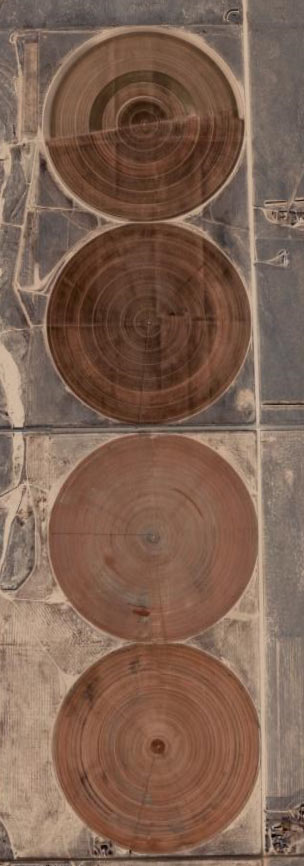
- What are these circles?
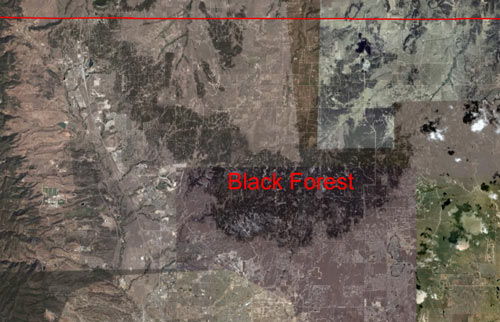
- Why do you think the trees in Black Forest grow in a relatively confined area of northern El Paso County?
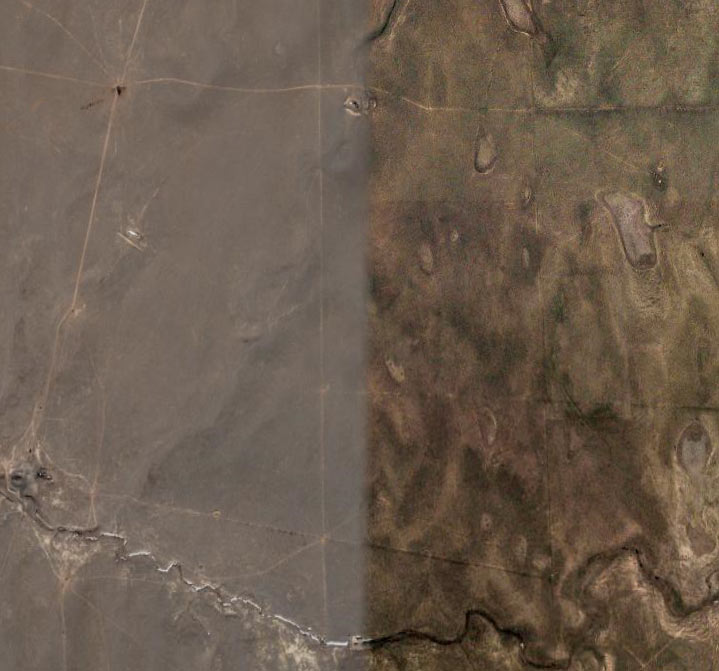
- What could have caused this abrupt change in color/image quality found in GE?
- What is the slope (in percent) from downtown Manitou Springs to the summit of Pikes Peak? HINT: Use the Ruler Path tool to create a path, and use the Show Elevation Profile tool to find rise (elevation gained) and run (distance). Make sure your units are same for rise / run (e.g., feet or meters or miles or km). Here is an image to help locate ends of your path.
- Link a .kmz file (that you have saved to your z: drive) of your favorite place in the world to your Lab Two webpage, like this.